QR Code Payment in China: How to Scan and Pay as a Foreigner (2026)
You’re standing at the counter with your coffee, the cashier points to a QR code, and there’s no card terminal in sight.
Do you scan the code? Or should you open a payment code on your phone and let the cashier scan you?
This is where QR code payment in China can feel confusing the first time you use it. Once you understand the two ways it works, however, the process is usually straightforward.
Foreign visitors can use Alipay or Weixin Pay—often called WeChat Pay in English—after linking a supported international bank card. The important part is knowing which code to open, what to check before confirming, and what to do if your international card suddenly disappears from the payment options.
Quick Summary
- At a supermarket or chain store? You’ll usually show your payment code for the cashier to scan.
- At a small shop, food stall or in a taxi? You’ll usually open Scan in Alipay or WeChat and scan the merchant’s QR code.
- Your international card isn’t listed? The QR code may have opened a personal transfer or may not support card-funded payments. Ask for another collection code, try the other payment app or use RMB cash.
- At a subway gate? Don’t use your normal payment code. Open the app’s Transport section and activate the metro QR code for your current city.
What You Need Before Making a QR Code Payment in China
Before trying to pay at a shop, make sure you have:
- Alipay or WeChat installed;
- an account registered with your mobile number;
- your passport available if identity verification is requested;
- a supported international bank card linked to the app;
- a working internet connection;
- a small amount of RMB cash as a backup.
You don’t normally need a Chinese bank account for everyday tourist purchases. Major international bank cards can be linked to supported Chinese payment apps, although the card issuer still needs to approve the connection.
If you haven’t set up a mobile wallet yet, start with our complete guide to paying in China. This article focuses on what happens after you arrive at the checkout and are ready to scan.
The Two Ways QR Code Payment Works in China
There are two common checkout situations.
| What happens | Where you’ll usually see it | What you need to do |
|---|---|---|
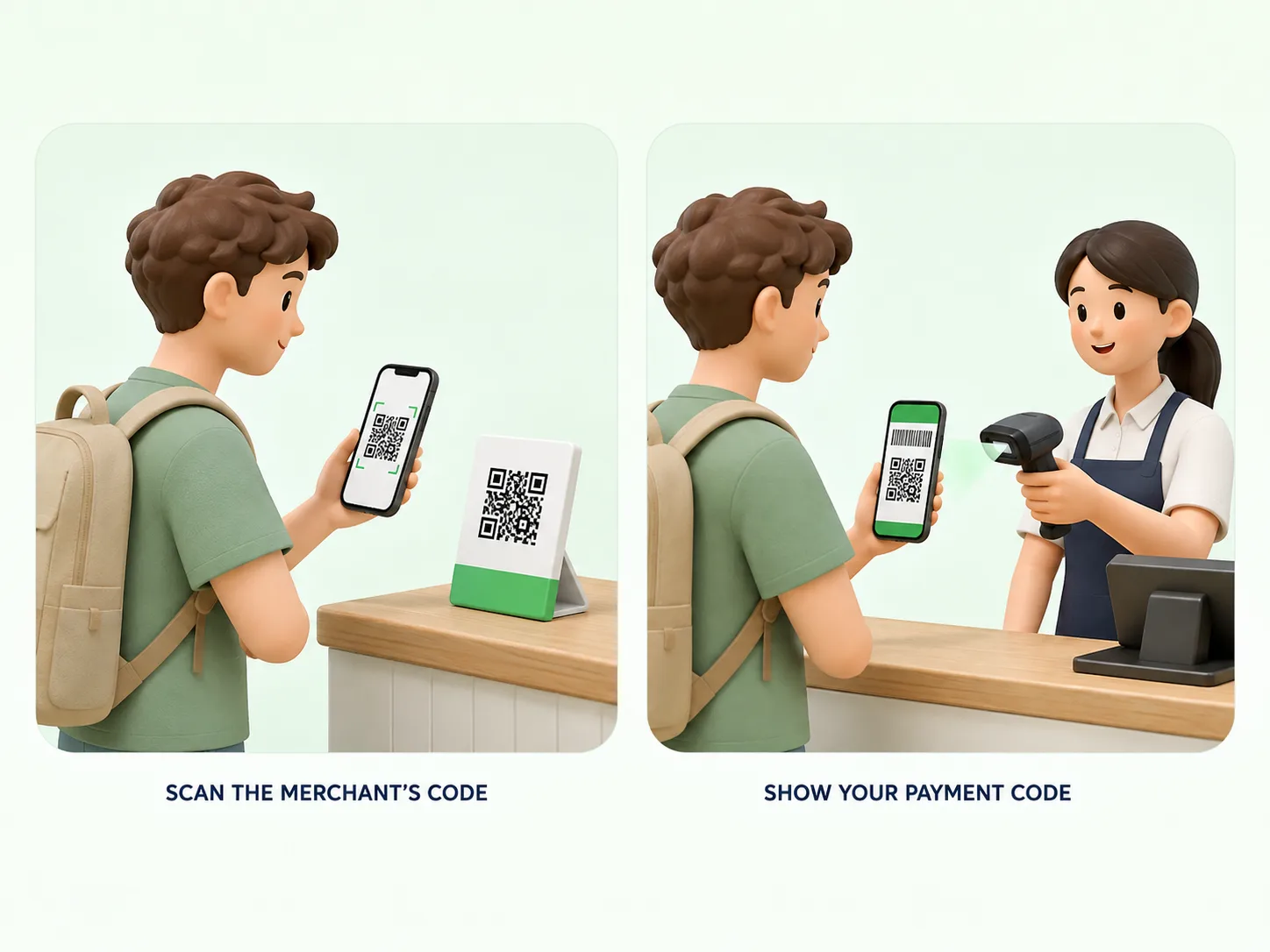
| You scan the merchant’s QR code | Small restaurants, food stalls, taxis and independent shops | Open Scan, scan the code and confirm or enter the amount |
| The cashier scans your payment code | Supermarkets, convenience stores, shopping malls and chain restaurants | Open your payment code and show it to the cashier |
These aren’t fixed rules. Some small shops may scan your payment code, while some larger businesses may ask you to scan a code displayed at the register.
Look at what the cashier is doing. If they point to a printed QR code, they probably want you to scan it. If there’s a barcode scanner beside the register, you’ll probably need to show your payment code.
SHOW THIS TO THE CASHIER
是我扫这个码,还是您扫我?
Shì wǒ sǎo zhège mǎ, háishì nín sǎo wǒ?
Should I scan this code, or will you scan mine?
How to Scan a Merchant’s QR Code
This method is common in small shops, cafés, taxis and food stalls.
Step 1: Open the scanner
In Alipay, tap Scan on the home screen.
In WeChat, tap the + icon near the top-right corner and select Scan. Depending on your app version and language settings, you may also find the scanner inside the payment section.
Step 2: Scan the merchant’s code
Point your camera at the QR code displayed on the counter, table, receipt or merchant’s phone.
The payment page should open automatically.
Step 3: Check the merchant’s name
Before entering an amount, look at the name displayed on the screen.
At a small family-run business, the name may belong to the owner rather than match the English name on the shop sign. If you’re unsure, show the screen to the merchant and ask them to confirm it.
Do not continue if the QR code:
- opens an unrelated website;
- requests unusual personal information;
- displays a name the merchant doesn’t recognize;
- asks you to install an unfamiliar app.
Step 4: Enter the amount
Some QR codes already contain the payment amount. Others require you to type it manually.
If you need to enter the amount yourself, check it carefully before confirming. Prices are shown in Chinese yuan, also written as RMB or CNY.
For example, entering 180 means RMB 180—not RMB 1.80.
Show the amount to the merchant before pressing the final payment button if you’re unsure.
Step 5: Check the payment method
Look for the selected bank card before confirming.
If your linked Visa, Mastercard or another international card is listed, select it and continue. If the card is missing or marked as unavailable, don’t keep pressing the payment button.
The problem may be related to:
- the type of QR code;
- the merchant’s payment setup;
- your identity verification;
- a restriction from your card issuer.
Step 6: Confirm the payment
Review the merchant name, amount, selected card and any service fee shown on the confirmation page.
Complete the requested password, fingerprint, facial recognition or other security check. Wait until the app displays a successful payment message.
The merchant may also receive a voice notification confirming the amount.
How to Show Your Payment Code to the Cashier
At supermarkets, convenience stores and larger retailers, you’ll usually show your code instead of scanning one.
Step 1: Open your payment code
In Alipay, open Pay/Collect or the payment option displayed on the home screen.
In WeChat, open the payment section and look for Money, Pay or the barcode and QR code designed to be shown to a cashier.
The exact labels may change between app versions.
Step 2: Select the correct bank card
Before showing the code, check which card will be charged.
If you’ve linked more than one card, select the one you want to use. The app may remember your previous payment method, so don’t assume it has chosen the right card automatically.
Step 3: Let the cashier scan your code
Turn your screen toward the cashier. Increasing the screen brightness may help if the scanner is having trouble reading it.
The cashier will scan the barcode or QR code, and the amount should appear in your app.
Step 4: Check and confirm the transaction
Check the amount before approving the payment.
Depending on the transaction amount and the app’s security settings, the payment may go through immediately or require a password, fingerprint or other confirmation.
Never send a screenshot of your active payment code to another person. Treat it like a physical payment card.
Why Your International Card May Not Appear
You can have a card successfully linked to Alipay or WeChat and still find that it isn’t available after scanning a particular QR code.
Several things can cause this.
The QR Code Opened a Personal Transfer
Some QR codes lead to a transfer between individual accounts rather than a standard merchant purchase.
Your linked international card may be available for purchases but unavailable for personal transfers. If the payment page uses words such as Transfer, asks you to add a transfer message, or only shows a wallet balance you don’t have, this may be the problem.
Ask whether the merchant has another collection code.
SHOW THIS TO THE CASHIER
这个码付不了,可以换一个收款码吗?
Zhège mǎ fù bù liǎo, kěyǐ huàn yí ge shōukuǎn mǎ ma?
I can’t pay with this code. Could you use a different payment QR code?
Don’t assume every food stall or small shop uses an incompatible code. Many small merchants can accept card-funded mobile payments.
What matters is whether your international card appears on the final payment page.
The Merchant’s Payment Setup Doesn’t Support the Card
The QR code may be valid, but that particular transaction may not support your linked international card.
Try the other payment app if you have both Alipay and WeChat Pay set up. A payment that fails in one app may work through the other because merchant acceptance can differ.
You can also ask the cashier to scan your payment code instead.
Your Bank Declined the Transaction
Your card issuer may treat a Chinese mobile-wallet payment as an unusual or international transaction.
Check your banking app for a security alert. If payments keep failing at different merchants, contact the number on the back of your card and ask whether the bank is blocking transactions through Alipay or WeChat Pay.
If possible, prepare two cards from different issuers before travelling.
Identity Verification Is Incomplete
The payment app may require identity verification before allowing certain transactions.
Follow the instructions displayed in the app. Your name should match the name shown on your passport and bank card as closely as the form allows.
The App Triggered a Security Check
A new device, a new location, several repeated payment attempts or an unusually large transaction may trigger an additional security review.
Don’t repeat the same payment many times in quick succession. Check whether any earlier attempt has already succeeded, then follow the instructions in the app or use another payment method.
Do You Need Mobile Data for QR Code Payments?
You should assume that you need a working internet connection.
Even if a payment code appears on your screen, the app may still need to load your payment method, verify the transaction, refresh account information or display the result.
Hotel Wi-Fi won’t help when you’re paying in a taxi, at a market or inside a small restaurant. Before leaving your hotel, make sure your SIM card, eSIM or international roaming connection is working.
It’s also sensible to keep:
- some RMB cash;
- a physical international card;
- both Alipay and WeChat Pay, if you can set them up;
- access to your bank’s mobile app.
QR code payment is convenient, but it shouldn’t be your only way to pay.
Payment QR Codes Are Not the Same as Metro QR Codes
The payment code you show at a shop is usually not the same code used at a subway gate.
For public transport, open the Transport section in Alipay, select your current city and follow the instructions to activate the local metro or bus code.
Some cities or transport services may require identity verification or additional setup.
Make sure you’ve selected the right city. A Shanghai transport code won’t automatically work as a Beijing transport code.
At the subway gate, use the activated transport QR code—not your normal shop payment code.
Payment options vary by city. Depending on where you are, you may also be able to use a single-journey ticket, transport card, RMB cash or a supported contactless international bank card.
What to Do When a QR Code Payment Fails
When you’re standing at the checkout, work through these steps:
- Check whether the merchant name and amount are correct.
- Open the payment-method list and see whether your international card appears.
- If the page looks like a personal transfer, ask for another QR code.
- Try showing your payment code instead of scanning the merchant’s code.
- Switch from Alipay to WeChat Pay, or the other way around.
- Check your banking app for a declined-transaction alert.
- Try a second international card.
- Pay with a physical card if the merchant has a compatible terminal.
- Use RMB cash.
SHOW THIS TO THE CASHIER
支付失败了,我可以换一种方式吗?
Zhīfù shībài le, wǒ kěyǐ huàn yì zhǒng fāngshì ma?
The payment failed. Can I use another payment method?
Most cashiers have seen failed mobile payments before. You can show them the error screen, but never reveal your payment password, full bank card number or verification code.
Check the Fee Before You Confirm
Fees, payment limits and supported card brands can vary between payment apps, cards and transaction types.
Always check the confirmation page before approving a payment. If the payment app charges a service fee, it should be displayed as part of the transaction details.
Your card issuer may also charge its own foreign transaction or currency conversion fee. This is separate from any fee displayed by Alipay or WeChat Pay.
Payment rules can change, so use the information displayed in the app as the final reference rather than relying on an old fee chart from a travel forum or video.
A Practical Payment Setup for Foreign Visitors
For most foreign tourists, a practical setup includes:
- Alipay with an international bank card linked;
- WeChat Pay as a second option;
- mobile data that works throughout the day;
- two international cards, if possible;
- a small amount of RMB cash.
Once you understand whether you should scan the merchant’s code or show your own payment code, paying in China becomes much easier.
If your international card disappears after scanning a QR code, don’t immediately assume the card is broken. Check whether the page is asking for a merchant payment or a personal transfer, then try another code, another app or another payment method.
FAQ
Can foreign tourists use QR code payment in China?
You can then scan a merchant’s collection code or show your payment code at participating businesses. Approval still depends on the payment app, merchant setup and card issuer.
Do I need a Chinese bank account?
Foreign visitors can link supported international cards to Alipay or WeChat Pay for eligible purchases. A Chinese bank account may provide access to additional functions, but it isn’t normally required for basic tourist spending.
Do I need a Chinese phone number?
However, your phone must be able to receive verification messages. Some connected services and mini programs may have their own phone-number requirements.
Can I pay every street vendor with an international card?
Many street vendors accept mobile payments, but whether your international card works depends on how the QR code and merchant account are configured.
Check whether your card appears on the payment confirmation page and keep some RMB cash available as a backup.
What should I do if the merchant’s QR code opens a transfer?
If it isn’t, ask the merchant for another collection code, try showing your own payment code, switch payment apps or use RMB cash.
Can I use my normal payment code to enter the subway?
Open the app’s Transport section and activate the correct metro or bus QR code for the city you’re visiting.
More to read

How to Use Public Transport in China: Metro, Buses & QR Codes for Tourists (2026)
2026.08.31
How to Order Food in China: QR Code Menus, Dietary Restrictions & Restaurant Etiquette
2026.08.29